Most firms looking for legal case management software for small law firms do not have a software problem. They have a scattering problem: the court portal, a spreadsheet, a messaging app and a paper diary each hold a quarter of the truth. In a two-lawyer firm that arrangement works for a long time. Then a hearing date lives only in one person's diary, a matter nobody has touched for two weeks slips out of mind, a power of attorney quietly expires, and nobody remembers whether the fee invoice was ever collected. The cause is not carelessness, it is that the information lives in four places that never look at each other.
This guide is written from the point of view of a small firm with two lawyers and one assistant. The examples run through a made-up practice called Arslan & Demir Law Office (demo data), and everything here works the same in a solo practice or a six-person office.
Where tracking breaks in a law firm
Almost every small firm runs on the same four tools: the court portal (the official state of the file), a spreadsheet (matter list, fees, notes), a messaging app (clients, opposing counsel, trainees, all in one thread) and a diary (hearings). Each is fine on its own. The breakage happens because none of them looks at the others.
- The court portal is not your firm's to-do list. It shows the official state of a file. Who takes the next step, who drafts the petition, what the client was last told: those answers are not there, and were never meant to be.
- A spreadsheet cannot hold a calendar. A date typed into a cell warns nobody. Without a reminder, the date lives in the memory of whoever typed it.
- A chat thread is not a record. The client asks how the hearing went, the assistant answers, nothing reaches the file. Two months later nobody can show what was said.
- A diary does not know outcomes. An interim decision is made, a new date is set, and only the date gets written down. Three months on, the story of the matter is gone.
- Authority and fees belong to nobody. The expiry of a power of attorney and the due date of an invoice are the two fields both partners assume the other one is watching.
- Knowledge collects in one person. When the assistant takes a week off, the firm slows down. That is a missing system, not a missing skill.
What fixes this is not more discipline, it is the information meeting on one record. The same problem on the commercial side is covered in what a CRM is, and the spreadsheet version of it in the Excel customer tracking guide.
The 8 things case management software must have
Feature lists in legal software are long; the part that matters is short. If a product cannot show you these eight, extending the trial will not change the outcome.
| Feature | Why it matters | What happens without it |
|---|---|---|
| 1. Matter records with file numbers court, file number, parties, type, value | People search for a matter by number, not by a name three clients share | Three matters of the same client blur together and the wrong file is opened |
| 2. A shared hearing calendar | Both lawyers' weeks must sit side by side, so you can see who is where | Two hearings land on the same hour and nobody notices |
| 3. Matter status preparation, filed, hearings, judgment, appeal, closed | Where a matter stands should be visible before you open it | Every question starts with "let me look at the file" |
| 4. Hearing outcomes and deadlines | What happened at the hearing defines the next job: interim decision, deadline, objection | The outcome is never written, the deadline is missed, the story is lost |
| 5. Powers of attorney with validity dates | Scope and expiry are independent of the matter and deserve their own record | Somebody acts on an authority that expired months ago |
| 6. A client card and document archive | When a client calls, every matter, document and message should be on one screen | "Let me check and call you back" becomes the standard answer, and the call rarely comes |
| 7. Fee and payment status | A judgment is not a collected fee | At month end nobody knows who owes what, and the conversation gets awkward |
| 8. Role-based access and audit logs | A file is not something everyone should open; a trainee and a partner cannot share permissions | When someone asks who opened a file, there is no answer |
The hearing calendar: seeing the week on one screen
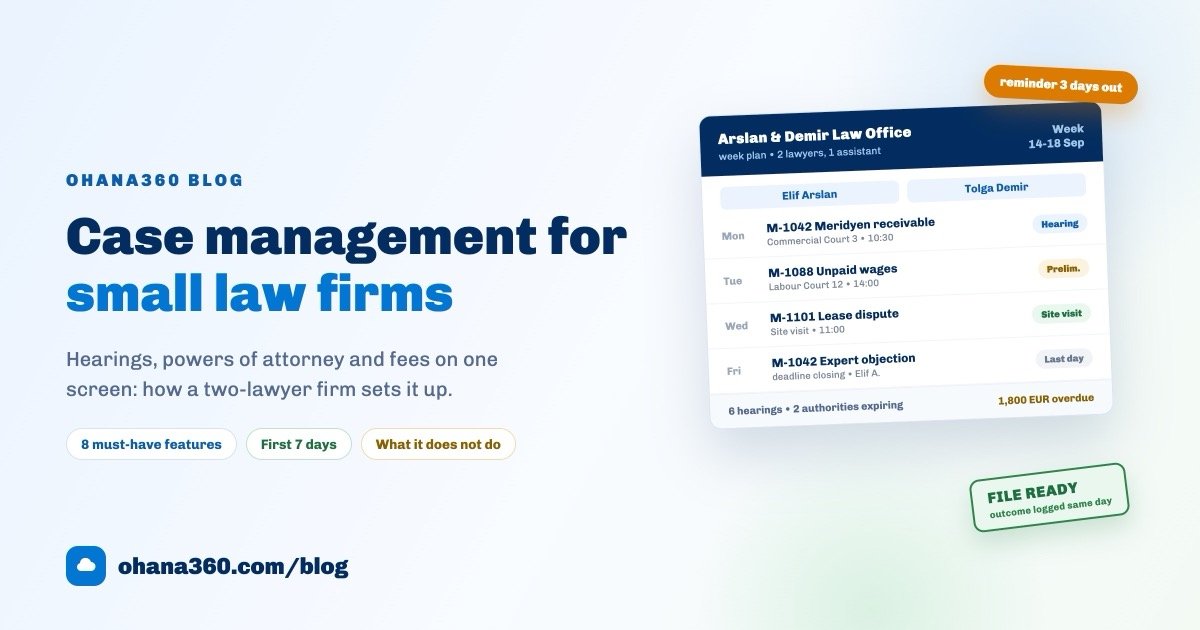
One shared diary is not enough for two lawyers. The week has to show who will be where. The diagram below shows a September week at Arslan & Demir Law Office (demo data).
The value of this screen sits in three places. The empty boxes: a day without a hearing is a day you can book for drafting. The "outcome not recorded" count: if a past hearing has no outcome written, the story of that matter broke on that day. The power-of-attorney box: authorities expiring within thirty days should be visible before anyone asks.
The second idea is the status path. A matter is not one line but three running in parallel: the state of the matter, of the authority and of the fee. Blur them together and "the judgment is in" starts to sound like "the money is in".
The distinction looks small, but the whole month-end check rests on it: closed matters and collected fees do not have to match, the gap between them has to be explainable.
Reminder discipline before a hearing
A missed hearing and a missed deadline are the two most expensive accidents in a small firm, and both happen for the same reason: the date is in one place and the preparation in another. Here is the rhythm Arslan & Demir runs:
- A hearing is recorded the day its date is known. In the system, not in a notebook. The day does not end with a date still outside the record.
- A file check seven days out. At the start of the week, next week's hearings are opened: is the petition ready, are the witnesses notified, is the authority still valid, has the client been told?
- A reminder to the responsible lawyer three days out. The system raises a notification and a preparation task appears on the matter. Three days is the shortest window in which a gap can still be closed.
- A message to the client one day out. If they are attending: time, place, courtroom. If not: "we will be there, I will call you in the evening." That one message removes three phone calls.
- The outcome is recorded the same day. This is the most important line here. The interim decision, the deadline granted and the new date are typed from the courthouse corridor. An outcome left until the evening slips to tomorrow, and an outcome left until tomorrow is usually never written at all.
- Hearings without outcomes are swept once a week. Five minutes on Friday afternoon: filter past hearings with an empty outcome and close them one by one.
What this rhythm needs from software is simple: if a record with a date can warn you before that date, the discipline holds; if it cannot, the discipline has been left to human memory. We covered how to build reminders in general in the automated reminders guide; in a law firm the only change is that the reference date is the hearing date.
Keeping the client informed: any channel, but always on the record
Most client dissatisfaction comes from silence rather than from the outcome. The pattern that works: a short update the same day as every hearing, plus a monthly "here is where we stand" note on matters that have gone quiet.
In most firms the channel is a messaging app, and that is fine, with three rules:
- Send it from the record. If the message is not logged as an activity on the client, you become a party to a "but I told you" argument two months later.
- Keep the content proportionate. Share that the hearing happened, the next date and the general stage; strategy, the text of an interim decision and the other side's submissions do not belong in a chat app.
- Do not create groups. In family or company matters, a group with several people in it is the easiest confidentiality mistake to make.
How to keep that channel disciplined is covered in the WhatsApp customer management guide; the logic is identical in a firm. For the same discipline on the clinical side, see the patient management guide.
Authority and fees: two quiet losses
Firms rarely lose money or authority in one dramatic event. They lose it in a quiet gap, and both gaps are about the calendar.
On the authority side the practical rule: every power of attorney gets its own record, number, notary, scope and end date. If the end date is left blank, that should be a deliberate choice rather than an oversight. Looking once a month at "authorities expiring in the next 60 days" prevents at least one crisis a year.
On the fee side the rule is: the fee agreement is written on day one and the invoice is recorded the day it is issued. Fixed, staged or success-based, it makes no difference: the record is created. At month end there are three numbers to look at:
- Total fees invoiced. What did the firm produce this month?
- Total collected. What actually came in?
- Overdue outstanding and its reason. Waiting on a stage, waiting on the client, or simply never chased?
In the example month at Arslan & Demir the gap was a single line: a 1,800 EUR fee invoice was twelve days past due and nobody had followed up (demo data). As long as the gap can be explained there is no problem; when it cannot, the loss has already started.
Practical confidentiality rules
What a law firm holds is by definition among the most sensitive data there is. The list below is not a legal checklist, it is the set of rules firms can actually keep. Assessing your professional and data protection obligations is your own job.
- No shared logins. In a firm where everyone signs in as "the office", who did what is unknowable. One account per person.
- Tie visibility to roles. A trainee does not need every matter; whoever handles the money does not need the case notes.
- Turn on two-factor authentication. Firm accounts are usually taken over by one click on one phone.
- Keep documents on the record. A petition on somebody's desktop disappears when that laptop is replaced, and nobody notices.
- Keep the audit log running. "Who opened this file" must have an answer. That protects the team rather than accusing it.
- Close a leaver's or a finished trainee's access the same day. The most skipped and most expensive item on this list.
- Limit exports. The number of people who can download the client list as CSV should fit on one hand.
- Keep case detail out of messaging. A hearing time is one thing, the text of an interim decision is another.
The first 7 days: a setup plan
Moves to firm software usually fail for one reason: trying to migrate everything at once. Seven days, one hour a day, is enough for most small firms.
| Day | What to do | What you have at the end of it |
|---|---|---|
| 1 | Import the client list from CSV: name, entity, phone, email, tax details if any | A searchable client database |
| 2 | Enter open matters: file number, client, court, case number, type, responsible lawyer, matter value | The firm's real work list |
| 3 | Put the next two months of hearings on the calendar; keep the paper diary, but run both | A hearing calendar with real data in it |
| 4 | Record powers of attorney: number, notary, scope, issue and expiry dates | An authority list with visible expiry |
| 5 | Enter outstanding fees: who, how much, due when | A real receivables list |
| 6 | Build the "three days before the hearing" reminder flow and test it on one matter | A reminder that runs itself |
| 7 | Switch on roles, two-factor authentication and audit logs; run a 30-minute rehearsal with the team | A working, protected setup |
On day eight, close the paper diary. Running two systems is useful in week one and harmful in week two: nobody writes in both places.
How Legal360 works in Ohana360
Legal360 is the industry edition of the Ohana360 platform for law firms. What it does, without inflation: matters, a hearing calendar, powers of attorney, client cards, tasks and a document archive. What it does not do, said plainly: there is no direct integration with a national court system, it does not issue legal electronic invoices, and it carries no separate billing object of its own.
- Matter record: title, client, matter type (commercial, employment, enforcement, family, criminal, administrative, property, other), court and chamber, case number, matter value, responsible lawyer, opening date, opposing party and opposing counsel, description. Statuses run along one path: Preparation, Filed, In Hearings, Judgment, Appeal, Closed.
- Hearing: matter, date, time, type (hearing, preliminary review, site visit, expert review), place and courtroom, note and outcome. Saving a hearing raises a notification, puts the record on the firm's unified calendar, and anything three days out or closer shows in red on the list. A past hearing with an empty outcome stays flagged as "outcome not recorded".
- Power of attorney: client, number, notary, scope, issue date, expiry and status (Active, Expired, Revoked). An expired authority shows in red on the list and appears next to the matter through the client name.
- Clients and archive: clients live on the Companies and People tabs; every matter record carries its files, tasks and team chat on the same page.
- Home page: the next seven days of hearings as a strip, and under it a "matters needing attention" list: an upcoming hearing (default threshold three days), no activity for thirty days, or a high matter value push a file to the top.
- Reminder flow: no legal-specific template ships in the box, but Matter and Hearing are both objects of the flow engine. You build "three days before the hearing, notify the responsible lawyer and create a preparation task" yourself: add a scheduled path, set the hearing date as the reference and choose three days before. The whole engine is described on the automation page.
- WhatsApp: if the WhatsApp360 add-on is in your package, any client record with a phone number gets a WhatsApp button. Pick a ready template, edit the text, and the send is logged on the record as a completed activity. Matter records have no phone field, so the button is used from the client's person or company card.
- Fees and collection: the matter record carries a matter value field; invoicing, due dates and payment tracking live in Finance360 (invoice statuses Draft, Sent, Partial, Paid, Overdue, Cancelled). In other words, fee tracking means adding Finance360 to your package.
- Security: per-organization data isolation, role-based permissions, audit logs, optional mandatory two-factor authentication, and files encrypted at rest.
- Migration and mobile: clients and matters import from CSV, and the iOS and Android apps are included in every plan, so tomorrow's hearing is readable from the courthouse corridor.
If you would rather see it than read it:
What exists on the court-portal side, and what does not
This section deserves plain language, because plenty of contracts in this market imply the opposite. Legal360 has no direct integration with a national court system. Ohana360 servers do not connect to a court portal, do not run queries on your behalf and do not file anything.
What exists instead is a local Chrome extension called "Ohana360 Yardımcısı", built for the Turkish lawyer portal UYAP. It works like this:
- The lawyer signs in to the portal with their own e-signature or mobile signature. The extension never sees a password, a PIN or a signature.
- The extension reads only the metadata already visible on the portal's own screens: file number, court unit, type, status, opening date, hearing date and the most recent case-history line. Document, download and file-content endpoints are skipped by a blocklist in the code, and fields such as national ID, address and phone are never carried.
- A panel appears in the corner. One button turns what was collected into matter and hearing records. Matching runs first on the portal's file id and, failing that, on case number plus court name; the same hearing is never written twice, and an open matter with an upcoming hearing moves to the "In Hearings" stage.
- The extension never writes anything back to the portal; the flow is one way.
One more limit: the extension is not published on the Chrome Web Store, it is installed as an unpacked extension in developer mode. So it is a local tool that takes a few steps to set up, not a one-click add-on. It removes the daily copy-paste into a spreadsheet, but it is not a promise of an integration.
A firm dashboard: which reports to build
In Ohana360 the legal object waiting in the Report Builder is "Matters (Legal)", and one report ships ready made: "Matter Value by Status". The list below is what a useful panel looks like for a small firm. The first seven rows are built as reports; the last three are saved list views rather than reports, because Hearings and Powers of Attorney are filtered on their list screens rather than in the report builder.
| # | What you see | Where it is built | Group by | Measure / filter |
|---|---|---|---|---|
| 1 | Matter value by status | Report: Matters (Legal) | Status | Sum of matter value (ships as standard) |
| 2 | Open matters per lawyer | Report: Matters (Legal) | Responsible lawyer | Record count, filter: Status ≠ Closed |
| 3 | Matter mix by type | Report: Matters (Legal) | Type | Record count |
| 4 | Matters by court | Report: Matters (Legal) | Court | Record count |
| 5 | Matters opened per month | Report: Matters (Legal) | Opened (calendar month) | Record count |
| 6 | Matter value per lawyer | Report: Matters (Legal) | Responsible lawyer | Sum of matter value |
| 7 | Outstanding fees | Report: Invoices (Finance360) | Status | Sum of amount, filter: Status ≠ Paid |
| 8 | This month's hearings | List view: Hearings | Sorted by date | Filter: date in this month |
| 9 | Hearings without an outcome | List view: Hearings | Sorted by date | Filter: date in the past, outcome empty |
| 10 | Authorities expiring soon | List view: Powers of Attorney | Sorted by expiry | Filter: Status = Active |
Put the reports on one dashboard and subscribe to it by email. The three numbers to check weekly are open matters per lawyer, hearings without an outcome, and outstanding fees. The rest explain why those three look the way they do.
To try it on your own data, sign up and enable Legal360 from the marketplace, or request a demo. The trial runs 14 days and needs no credit card; industry editions are 250 EUR per month per organization, with a 90% launch discount while the campaign runs. Current numbers are on the pricing page. If you are coming from Salesforce, the Salesforce alternative guide shows what the move looks like.
Frequently asked questions
What does legal case management software actually do?
Which features does a small law firm really need?
Does Legal360 integrate with the courts?
How should client data and file confidentiality be handled?
Are hearing reminders automatic?
Keep your firm's week on one screen
Matters, a shared hearing calendar, powers of attorney with expiry dates and the client archive in the same place. 14 days free, no credit card needed.